This topic describes how to use Zesty Commitment optimization to manage your database commitments.
You can use the databases Commitment optimization page to:
View savings from database commitments.
Track commitment coverage and Savings Plan utilization.
Compare savings from Zesty-managed and customer-managed commitments.
Review active commitments.
Identify additional savings opportunities.
You can view the Databases page even if Zesty does not currently manage your Database Savings Plans.
Database Savings Plan eligibility
The Databases page shows savings, costs, coverage, and utilization only for workloads that are eligible for AWS Database Savings Plans. If you use AWS databases that are not eligible, the data shown on the Databases page may not match your data from AWS.
AWS can change the services and instance types that are eligible for Database Savings Plans. For current eligibility information, see Savings Plans types in the AWS documentation.
Prerequisites
Your AWS account is integrated with the Zesty platform.
For information about integrating an AWS account, see Onboard an AWS account with Zesty.Zesty has access to your AWS Cost and Usage Report (CUR).
You have access to the Zesty platform.
If you have questions or need additional help, reach out to Customer Support.
To view the Databases commitment optimization page:
From the Zesty platform main menu, choose Commitment Manager > Databases.
.png)
KPIs
The Databases page shows the following KPIs:
All-time savings: total savings achieved since Commitment Manager began managing your database commitments
Savings (last 30 days): savings achieved during the past 30 days.
SP coverage: percentage of current database usage covered by commitments.
Potential savings: savings that can be achieved by activating Zesty SP automation
Potential savings from upgrades: additional savings that can be achieved by upgrading current database instances to instances that are AWS-eligible
For more information about potential savings, see Additional savings opportunities.
Graphs
The Databases page shows the following graphs:
Graph | Description | Graph options |
|---|---|---|
Cost over time | Shows database costs and savings over the selected period. The By savings view shows:
The By service view shows the total On-Demand cost for each database service. | Click By savings or By service to change the view. You can also filter the graph by database service and show data by day, week, or month. |
Coverage over time | Shows the percentage of database usage covered by commitments each day. | Click Steady state to view coverage for stable, ongoing usage without short-term demand fluctuations. Click Total to include temporary demand fluctuations. |
Covered vs Uncovered On-Demand | Shows the On-Demand equivalent cost divided into usage covered by Database Savings Plans, usage covered by customer-purchased RIs, and uncovered On-Demand usage. “Coverage” includes customer-purchased database RIs. Zesty manages Database SPs, not database RIs. | |
DB savings breakdown | Shows total database savings divided into Customer savings from customer-managed commitments and Managed savings from Zesty-managed Database Savings Plans. | |
SP utilization | Shows the used and total Database Savings Plan commitments. A difference between these values indicates unused commitment. |
By default, the graphs show data from the last 30 days. Select a different date range to apply it to all the graphs.
Tip: When you hover over graph data, the Databases page shows additional details.
Data delivery information
Due to AWS CUR delays, data that includes a previous month becomes final only after the seventh day of the current month. The Databases page does not include data from the last 48 hours.
Additional savings opportunities
Zesty shows when you are not maximizing your savings in the following ways:
Savings by managing SP with Zesty
If Zesty isn’t managing your database SPs, the Databases page shows how much you can save by activating Savings Plan automation. Click the call to action to contact Zesty about activating the service.
Zesty derives the potential savings from your CUR data.Savings by upgrading to SP-eligible instances
If Zesty is managing your database SPs, you may be able to save even more by upgrading DB instances that are not currently eligible for Savings Plans to instances that are eligible. Contact your Customer Success representative to review the recommendations.
View active commitment details
You can see a list of all your active Database Savings Plans and customer-purchased RIs. The table shows many details, including: Commitment ID and type, savings, utilization and more.
To view commitments:
From the Databases page, click View commitments.
The commitments list is displayed.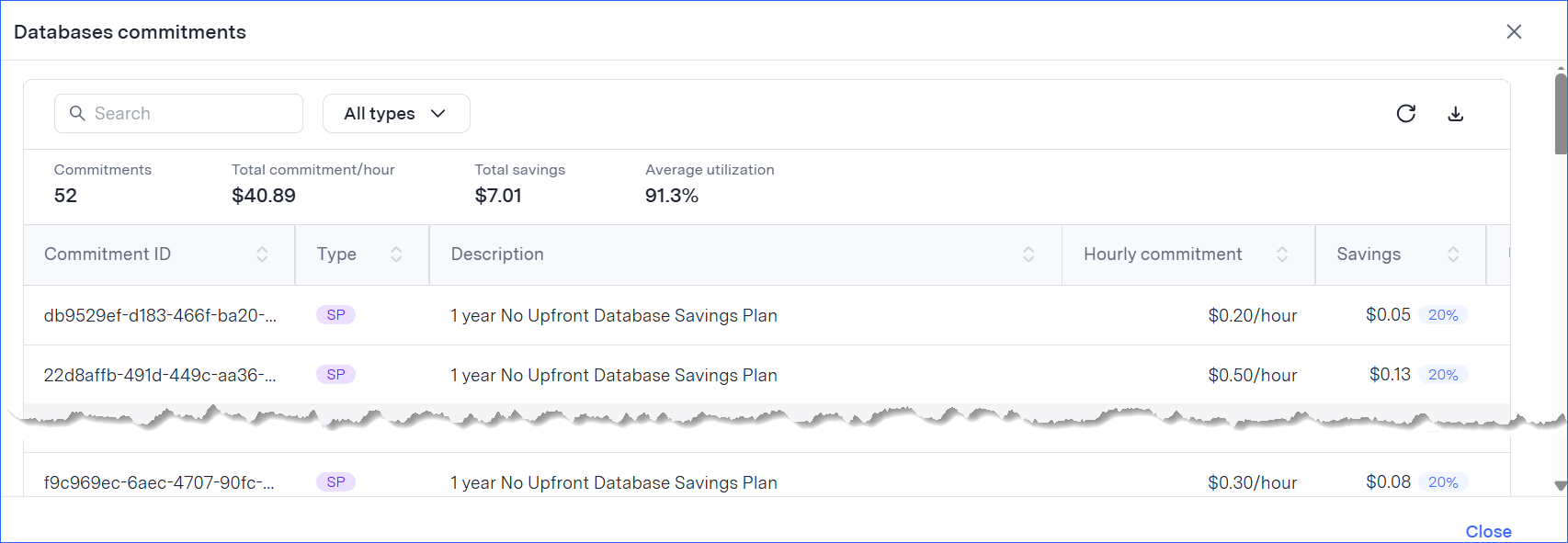
To download the full list, click Download.